
VuePress 博客的 CI/CD 自动化部署实践
本文详细介绍了基于 VuePress Plume 主题的博客站点的完整 CI/CD 自动化部署方案,包括 Jenkins 容器化部署、GitHub Actions 触发、构建优化以及常见问题的解决方案。
整体架构
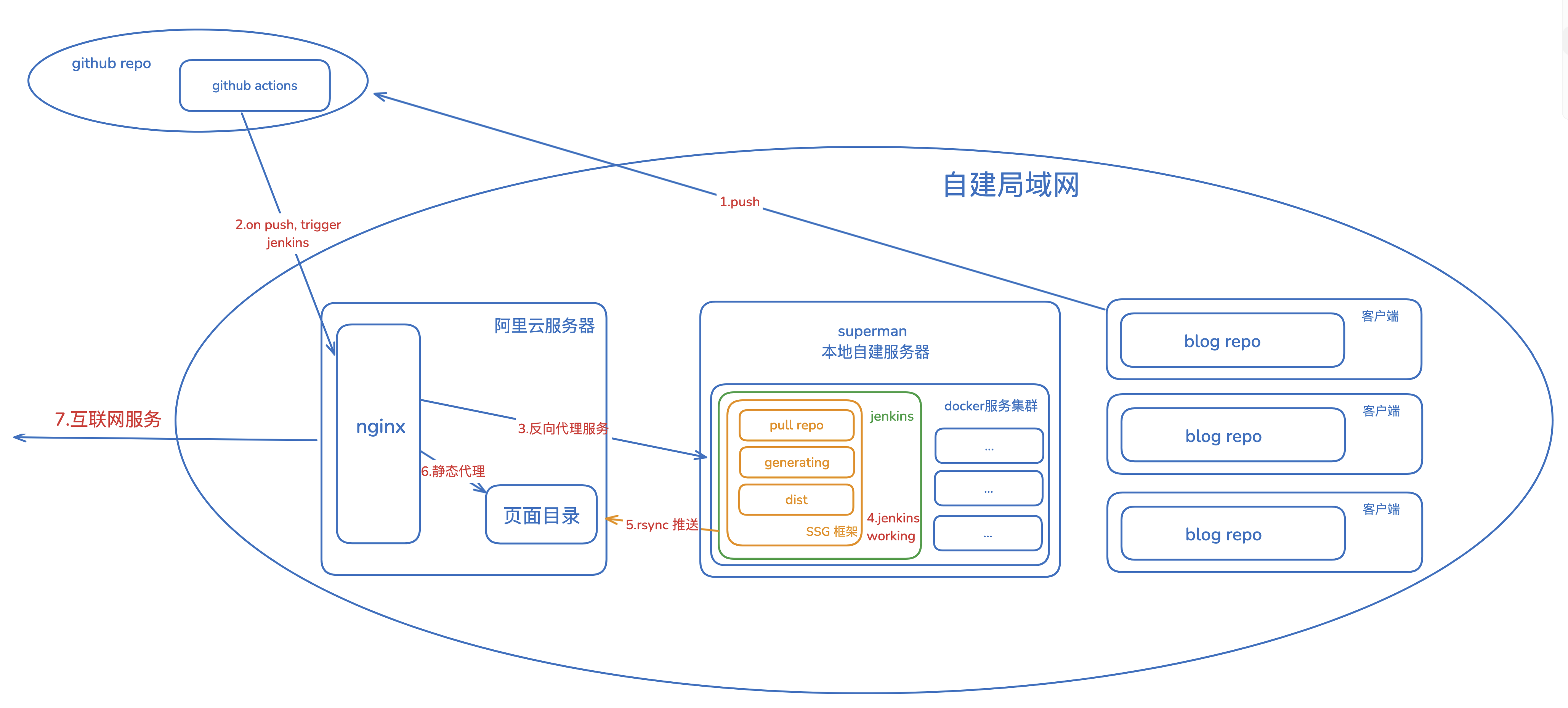
网络拓扑
技术栈
- 静态站点生成器: VuePress 2.x + vuepress-theme-plume
- CI/CD 工具: Jenkins (Docker 容器化) + GitHub Actions
- 包管理器: pnpm
- Web 服务器: Nginx
- 部署方式: rsync
工作流程
- 开发者推送代码到 GitHub 仓库的
master分支 - GitHub Actions 自动触发 Jenkins 构建任务
- Jenkins 容器内执行构建脚本:
- 拉取最新博客内容
- 安装依赖(pnpm)
- 构建静态站点(VuePress)
- 通过 rsync 将构建产物同步到远程博客服务器
- Nginx 提供静态文件服务
Jenkins 环境搭建
Docker Compose 配置
docker-compose.yml
version: "3.8"

services:
  jenkins:
    build: .
    container_name: jenkins
    user: root
    ports:
      - "8567:8080"      # Jenkins Web 界面
      - "50000:50000"    # Jenkins Agent 通信端口
    volumes:
      - ./jenkins_home:/var/jenkins_home
      - /var/run/docker.sock:/var/run/docker.sock
      - ./.ssh:/root/.ssh  # SSH 密钥,用于 rsync 部署
    environment:
      - JAVA_OPTS=-Djenkins.install.runSetupWizard=false
    restart: unless-stopped
Dockerfile 优化
关键改进:
- 使用国内镜像源加速构建
- 安装 Node.js 20.x LTS 版本
- 全局安装 pnpm 包管理器
- 配置 npm 使用淘宝镜像
FROM jenkins/jenkins:lts
USER root

# 配置国内镜像源加速 apt-get
RUN sed -i 's/deb.debian.org/mirrors.aliyun.com/g' /etc/apt/sources.list.d/debian.sources

# 安装 Node.js 20.x 和 rsync
RUN curl -fsSL https://deb.nodesource.com/setup_20.x | bash - && \
    apt-get update && \
    apt-get install -y nodejs rsync

# 配置 npm 镜像源并安装 pnpm
RUN npm config set registry https://registry.npmmirror.com && \
    npm install -g pnpm

# 验证安装
RUN node -v && npm -v && pnpm -v && rsync --version

USER jenkins
Jenkins 配置
1. 网络配置
通过 Nginx 反向代理暴露 Jenkins 服务:
server {
    listen 443 ssl http2;
    server_name jenkins.zqzqsb.cn;

    ssl_certificate /path/to/cert.pem;
    ssl_certificate_key /path/to/key.pem;

    location / {
        proxy_pass http://localhost:8567;
        proxy_set_header Host $host;
        proxy_set_header X-Real-IP $remote_addr;
        proxy_set_header X-Forwarded-For $proxy_add_x_forwarded_for;
        proxy_set_header X-Forwarded-Proto $scheme;
    }
}
2. 用户管理
在 系统管理 → 全局安全配置 中:
- 安全域:选择 "Jenkins 专用用户数据库"
- 授权策略:选择 "登录用户可以做任何事"

3. 必要插件
安装以下插件:
- Git Plugin - Git 仓库集成
- GitHub Plugin - GitHub Webhook 支持
- Localization: Chinese (Simplified) - 中文界面
4. Job 配置
创建自由风格项目 GenBlog:
构建触发器:
- 勾选 "触发远程构建"
- 设置身份验证令牌(例如:
blog-build-token)

构建步骤:
- 添加 "执行 shell"
- 命令:
bash gen_blog_dist.sh
GitHub Actions 配置
在博客仓库创建 .github/workflows/trigger-jenkins.yml:
name: Trigger Jenkins Build

on:
  push:
    branches:
      - master
  workflow_dispatch:  # 支持手动触发

jobs:
  trigger-jenkins-build:
    runs-on: ubuntu-latest

    steps:
      - name: Checkout code
        uses: actions/checkout@v3

      - name: Trigger Jenkins build
        run: |
          curl -v -X GET "${JENKINS_URL}/job/GenBlog/build?token=${API_TOKEN}"
        env:
          JENKINS_URL: https://jenkins.zqzqsb.cn
          API_TOKEN: ${{ secrets.JENKINS_API_TOKEN }}
配置 GitHub Secrets:
- 进入仓库 Settings → Secrets and variables → Actions
- 添加
JENKINS_API_TOKEN,值为 Jenkins 中设置的令牌
构建脚本
项目结构
/var/jenkins_home/workspace/GenBlog/Vuepress/
├── blog/                  # Git 子模块,博客内容仓库
├── docs/                  # VuePress 源码目录
│   ├── .vuepress/
│   │   ├── config.js     # VuePress 配置
│   │   └── dist/         # 构建产物
│   └── *.md              # 从 blog/ 复制的文章
├── package.json
├── pnpm-lock.yaml
├── gen_blog_dist.sh      # 构建脚本
└── README.md
构建脚本 gen_blog_dist.sh
#!/bin/bash

# 生成博客静态文件
function GenBlogDist()
{
    # 拉取最新博客内容
    cd ./blog && git pull && cd ..

    # 复制博客内容到 VuePress 源码目录
    rm -rf ./docs/* && cp -r ./blog/* ./docs/
    cp ./README.md ./docs/

    # 安装依赖并构建
    # 使用 --no-frozen-lockfile 允许 CI 环境更新 lockfile
    pnpm install --no-frozen-lockfile
    pnpm run docs:build
}

# 部署到远程服务器
function PushDistToServer()
{
    local LocalDist="./docs/.vuepress/dist"
    local RemoteDir="/home/zhangqing/blog/"
    local RemoteHost="ALiCloud2C2G"

    if [ "$(ls -A ${LocalDist})" ]; then
        echo "LocalDist is not empty, starting rsync..."
        rsync --quiet -avz --delete "$LocalDist" "$RemoteHost:$RemoteDir"
    else
        echo "Local Dir is empty, nothing to push."
    fi
}

# 执行构建和部署
GenBlogDist && PushDistToServer
echo "Done!"关键点:
pnpm install --no-frozen-lockfile:允许 CI 环境更新依赖锁文件rsync --delete:删除远程服务器上多余的文件,保持同步
VuePress 配置
基础配置 docs/.vuepress/config.js
import { defineUserConfig } from "vuepress";
import { plumeTheme } from "vuepress-theme-plume";
import { viteBundler } from "@vuepress/bundler-vite";

export default defineUserConfig({
  bundler: viteBundler(),

  theme: plumeTheme({
    lang: "zh-CN",
    hostname: "blog.zqzqsb.com",

    // Markdown 增强功能
    markdown: {
      // 图表支持
      mermaid: true,
      echarts: true,
      flowchart: true,

      // 代码演示
      demo: true,

      // 代码分组
      codeTabs: true,

      // 提示容器
      alert: true,
      hint: true,

      // 数学公式
      math: true,

      // 图片增强
      image: {
        figure: true,
        lazyload: true,
        mark: true,
        size: true,
      },

      // 文件包含
      include: true,
    },

    // 代码高亮配置
    plugins: {
      shiki: {
        languages: [
          "shell", "yaml", "javascript", "typescript",
          "vue", "c++", "c", "go", "rust", "python",
          "bash", "http", "html", "css", "json"
        ],
      },
    },

    // 博客和笔记集合配置
    collections: [
      {
        type: "post",
        dir: "",
        link: "/blog/",
        title: "博客",
        exclude: ["Notes/**", "README.md", ".vuepress/**"],
      },
      {
        type: "doc",
        dir: "Notes/Golang",
        link: "/notes/Golang/",
        linkPrefix: "/notes/Golang/",
        title: "Golang 学习笔记",
        sidebar: "auto",
      },
      // ... 其他笔记集合
    ],
  }),
});
依赖管理 package.json
{
  "scripts": {
    "docs:dev": "vuepress dev docs",
    "docs:build": "vuepress build docs"
  },
  "dependencies": {
    "vuepress-theme-plume": "1.0.0-rc.187",
    "echarts": "^6.0.0",
    "mermaid": "^11.4.1",
    "flowchart.ts": "^3.0.1"
  },
  "devDependencies": {
    "@vuepress/bundler-vite": "2.0.0-rc.26",
    "@vueuse/core": "^14.2.0",
    "sass-embedded": "^1.97.3",
    "typescript": "^5.7.3",
    "vue": "^3.5.13",
    "vuepress": "2.0.0-rc.26"
  }
}
常见问题与解决方案
1. Git 权限问题
问题:Jenkins 容器内 Git 操作报错 detected dubious ownership
原因:Docker 容器以 root 用户运行,Git 检测到目录所有者不匹配
解决方案:
# 在 Jenkins 容器内执行
git config --global --add safe.directory /var/jenkins_home/workspace/GenBlog/Vuepress
2. Node.js 版本不兼容
问题:VuePress 2.x 需要 Node.js >= 18.19.0
解决方案:
- 在 Dockerfile 中使用 Node.js 20.x LTS
- 本地开发使用 nvm 切换版本:
nvm use 20
3. pnpm 锁文件冲突
问题:CI 构建时报错 ERR_PNPM_OUTDATED_LOCKFILE
原因:pnpm 默认要求 lockfile 与 package.json 完全匹配
解决方案:
# 在 CI 环境使用
pnpm install --no-frozen-lockfile
4. VuePress Plume 主题配置问题
问题 4.1:博客分类显示为 0
原因:collection.dir: "." 导致路径匹配失败
解决方案:
collections: [
  {
    type: "post",
    dir: "",  // 使用空字符串而不是 "."
    // ...
  }
]
问题 4.2:笔记侧边栏不显示
原因:collection.dir 和 collection.link 大小写不匹配
解决方案:
{
  type: "doc",
  dir: "Notes/Golang",           // 实际目录路径
  link: "/notes/Golang/",        // URL 路径(小写)
  linkPrefix: "/notes/Golang/",  // 必须与 link 一致
  sidebar: "auto",
}
问题 4.3:Mermaid 图表不渲染
问题:配置了 plugins.markdownChart 但图表仍显示为代码块
根本原因:配置位置错误
错误配置:
plugins: {
  markdownChart: {
    mermaid: true,
    echarts: true,
  }
}正确配置:
markdown: {  // 注意:是 markdown 字段,不是 plugins
  mermaid: true,
  echarts: true,
  flowchart: true,
}必要依赖:
pnpm add mermaid echarts flowchart.ts验证方法:
- 检查构建产物中是否有
mermaid.esm.min-*.js - 检查 HTML 中是否有
<div class="mermaid-wrapper">
5. 依赖版本冲突
问题:unmet peer echarts@^6.0.0: found 5.6.0
解决方案:
# 升级到兼容版本
pnpm add echarts@^6.0.0
6. 构建速度优化
问题:每次构建耗时较长
优化方案:
- 使用国内镜像源:
# Dockerfile
RUN npm config set registry https://registry.npmmirror.com- pnpm 缓存:
# 在 Jenkins 中配置持久化 pnpm store
volumes:
- ./pnpm-store:/root/.local/share/pnpm/store- 增量构建:
- VuePress 自动缓存编译结果
- 只重新构建修改的文件
7. rsync 权限问题
问题:部署时报错 Permission denied 删除 .well-known/acme-challenge
原因:Let's Encrypt SSL 证书验证文件由系统管理
解决方案:
# 方案 1:排除该目录
rsync -avz --delete --exclude='.well-known' "$LocalDist" "$RemoteHost:$RemoteDir"

# 方案 2:忽略该错误(不影响博客部署)
# 该错误不会影响博客内容的正常部署
部署验证
本地测试
# 开发模式
pnpm run docs:dev

# 构建测试
pnpm run docs:build

# 预览构建产物
cd docs/.vuepress/dist
python3 -m http.server 8080
CI 构建日志检查
关键检查点:
- ✅ Git pull 成功
- ✅ pnpm install 完成,无错误
- ✅ VuePress build 成功
- ✅ rsync 同步完成
- ✅ 无 Markdown 插件警告
线上验证
功能验证:
性能验证:
最佳实践
1. 版本管理
- 锁定主要依赖版本:避免自动升级导致的兼容性问题
- 定期更新依赖:每月检查并更新依赖版本
- 使用语义化版本:
^允许小版本更新,~只允许补丁更新
2. 安全配置
- SSH 密钥管理:使用专用的部署密钥,限制权限
- Jenkins 令牌:定期轮换 API Token
- 环境变量:敏感信息使用 GitHub Secrets
3. 监控与日志
- 构建通知:配置 Jenkins 邮件通知或 Webhook
- 日志保留:保留最近 30 次构建日志
- 性能监控:使用 Lighthouse 定期检查性能
4. 备份策略
- 代码备份:GitHub 仓库
- 构建产物备份:保留最近 3 次构建的 dist 目录
- 配置备份:定期导出 Jenkins 配置
参考文档
官方文档
插件文档
相关技术
总结
本文介绍了一套完整的 VuePress 博客 CI/CD 自动化部署方案,涵盖了从环境搭建、配置优化到问题排查的全过程。通过 Jenkins 容器化部署和 GitHub Actions 触发,实现了代码推送后的自动构建和部署,大大提高了博客维护效率。
核心要点:
- 使用 Docker 容器化 Jenkins,确保环境一致性
- 配置国内镜像源,加速构建过程
- 正确配置 VuePress Plume 主题的 markdown 增强功能
- 使用 pnpm 管理依赖,提高安装速度
- 通过 rsync 实现高效的增量部署
希望这篇文章能帮助你快速搭建自己的博客 CI/CD 流程,避免踩坑!
Copyright
Copyright Ownership:
License under:Attribution 4.0 International (CC-BY-4.0)